Freight forwarding is a relationship business, but the customer relationship does not end when a quotation is accepted. It continues through booking, shipment execution, document exchange, status updates, invoicing and the final margin on the job.
That is why a generic contact database is rarely enough. A useful CRM for freight forwarders must connect customer activity to the operational and financial work that follows. When it does, sales, operations, documentation and finance stop rebuilding the same context in separate spreadsheets, inboxes and systems.
In short: freight CRM software gives every team one reliable view of the customer and every freight job attached to that customer. The result is faster quotation handling, cleaner handovers, better shipment visibility, more accurate billing and a clearer picture of profitability.
What is freight CRM software?
Freight CRM software is customer relationship management built around the way freight forwarders sell and execute work. It connects customer accounts, inquiries, trade lanes, buying rates, quotations and follow-ups with the shipments, documents, charges and invoices that result from a won opportunity.
A generic CRM normally stops at the sales pipeline. A freight forwarding CRM should continue into the job itself. The commercial promise, shipment record and financial outcome stay connected, so teams can answer questions such as:
- Which quotations are still waiting for approval?
- Which customers ship on a particular lane or mode?
- What was promised before operations received the job?
- Which shipments are delayed or missing a milestone?
- Has every cost and charge been captured before invoicing?
- Which customers, lanes and jobs are producing healthy margins?
That operational context is what turns CRM data into day-to-day control.
Why disconnected freight workflows create avoidable problems
Many forwarding teams still use a familiar stack: email for inquiries, spreadsheets for rates, chat for internal coordination, a shipment tracker for operations and accounting software for invoices. Each tool may work on its own, but the handoffs between them are where information is lost. Our freight forwarding software guide maps which records CRM, TMS, FMS, quoting and accounting tools should own.
Sales may know why a customer chose a route, while operations sees only the final booking. A revised rate can remain in an email thread. Finance may prepare an invoice before a late carrier charge is recorded. Customer service may need to ask operations for a status that already exists somewhere else.
The problem is not a lack of effort. It is that the freight job has no single source of truth. A connected logistics CRM fixes that by keeping the customer, commercial decision, shipment activity and financial record in one workflow.
1. Turn customer inquiries into controlled quotations
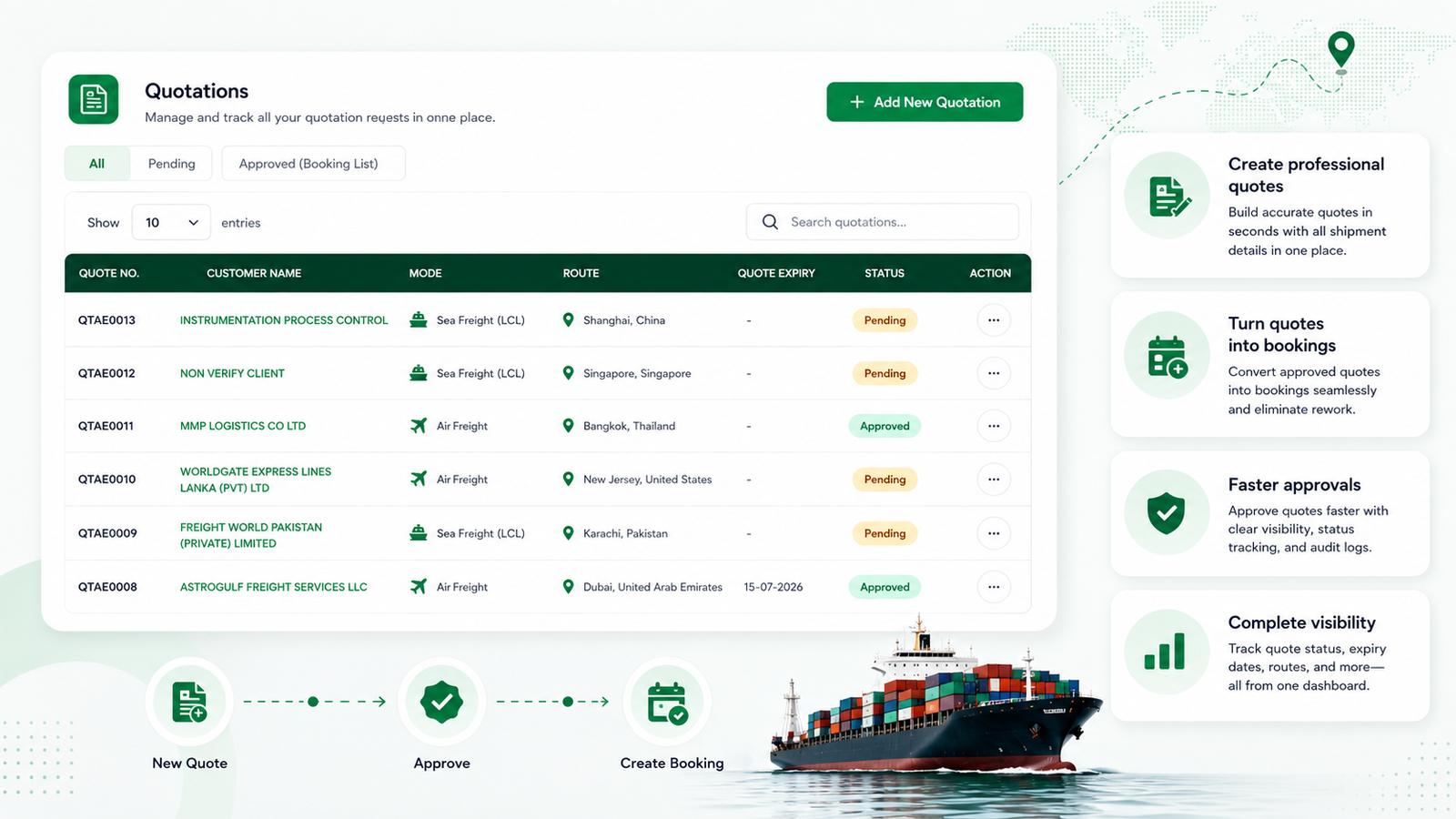
Every profitable freight job starts with a clear inquiry. The sales team needs the customer, origin, destination, shipment mode, cargo requirements and timing before pricing can begin. When those details are captured once in a freight CRM, rate coordinators and approvers work from the same request.
Waybill CRM keeps quotations visible by customer, mode, route, expiry date and approval status. A team can see which quotes are pending, which have been approved and which are ready to become bookings. That structure helps forwarders:
- respond to inquiries without searching old email threads;
- compare and approve buying and selling information consistently;
- keep quote validity and ownership visible;
- reduce manual re-entry when an approved quote becomes a job; and
- review quotation activity by customer and route.
The gain is not simply faster quote creation. It is a cleaner commercial handover. Operations receives the same customer, cargo, routing and pricing context that sales used to win the work.
2. Centralize shipments, milestones and documents
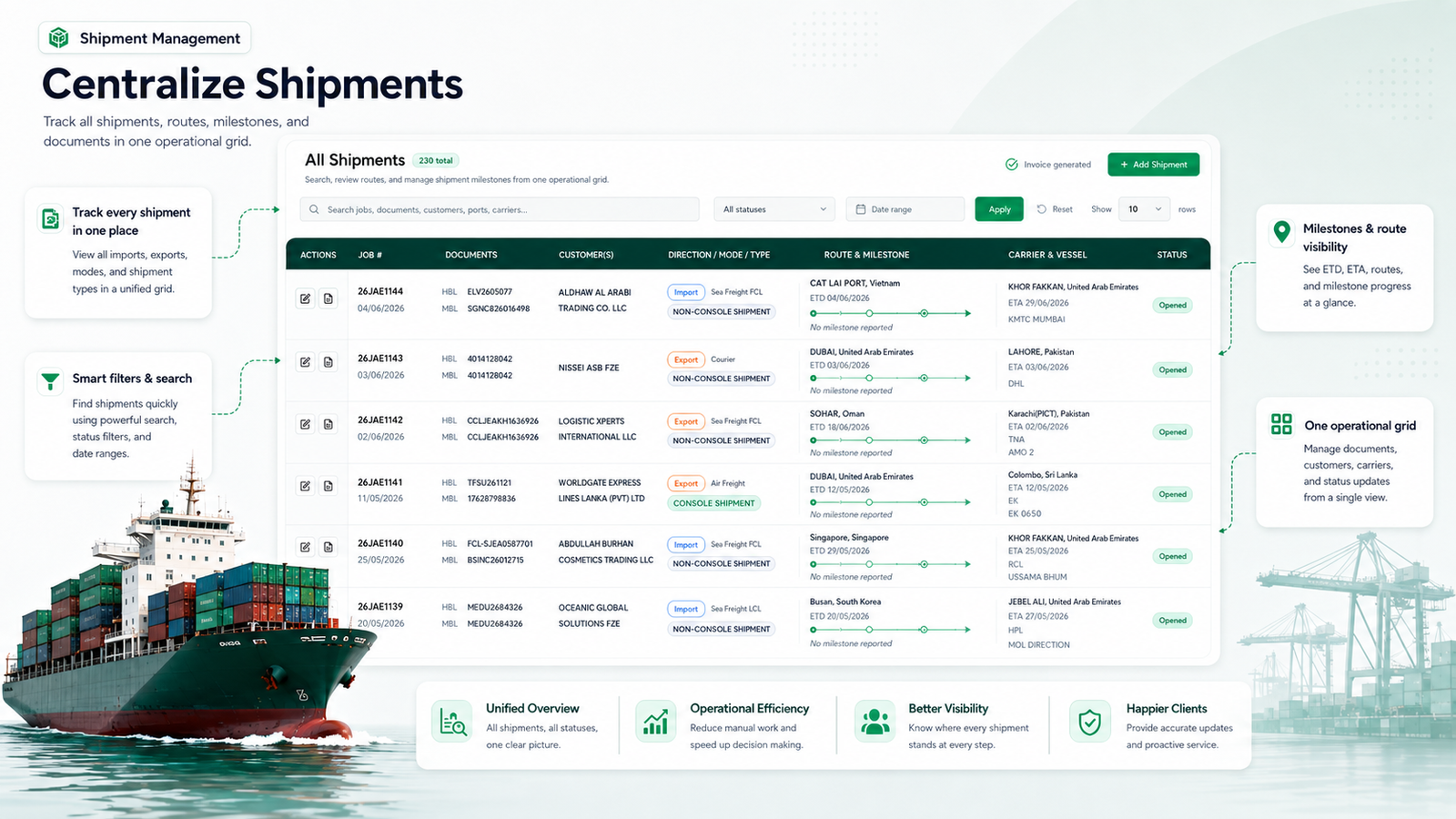
Once a quotation becomes a shipment, the priority changes from winning the job to executing it well. Teams need to find active work quickly, understand what is happening next and identify exceptions before a customer has to ask.
A centralized shipment workspace brings imports, exports, air freight, sea freight, courier jobs and consolidation activity into one operational grid. Search and filters help users locate a job by customer, document, route, carrier, status or date. Each record can carry its own parties, cargo details, milestones, documents and financial activity.
For a freight forwarder, this means:
- one place to review ETD, ETA, route and milestone progress;
- fewer status trackers maintained by different employees;
- shipment documents attached to the job that produced them;
- clearer ownership across sales, operations and documentation; and
- more consistent updates for customers and management.
The customer relationship improves because the team is working with current operational context. Instead of replying with “we are checking,” a user can see the latest milestone, the responsible carrier and the next required action.
3. Keep documents and customer updates connected to the job
Freight forwarding creates a long document trail: quotations, bills of lading, air waybills, customs information, manifests, invoices, proof of delivery and supporting files. When documents live in personal inboxes or disconnected folders, teams waste time locating the latest version and risk using outdated data.
A freight CRM connected to shipment management lets structured job data flow into operational documents and reports. It also gives customer-facing teams the same shipment context as operations. The benefits are practical:
- customer and shipment details are entered once and reused;
- documents remain searchable against the correct job;
- status updates are based on live operational information;
- handovers do not depend on one employee’s inbox; and
- managers gain a consistent audit trail from inquiry to completion.
This is where a freight-specific platform differs most from a generic CRM. It does not treat the booking as the end of the customer journey. It keeps the relationship connected to the cargo while the job is in motion.
4. Connect billing to shipment profitability
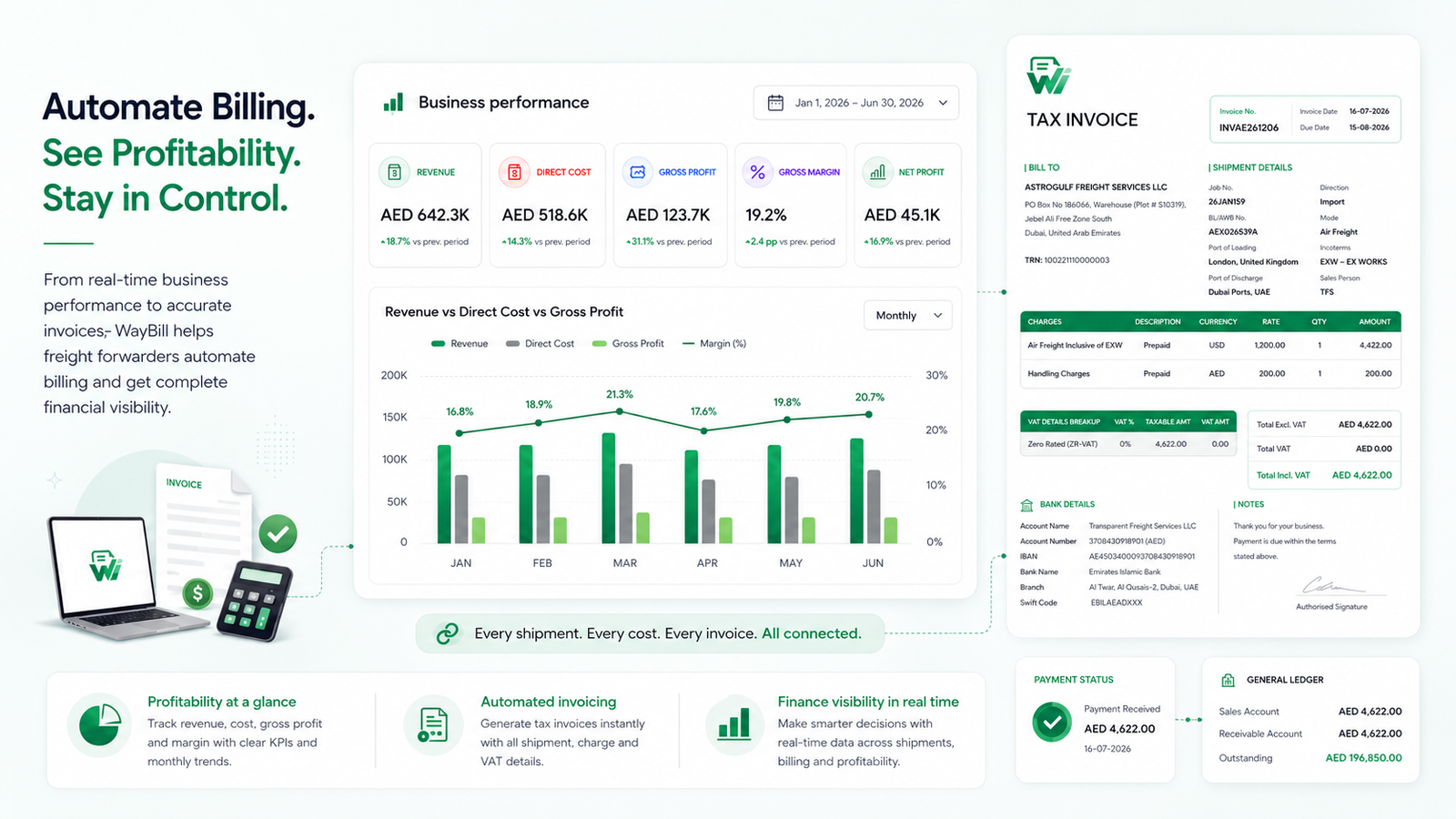
A shipment can look successful operationally and still underperform financially if costs arrive late, charges are missed or invoices are prepared from incomplete information. Freight billing software works best when it is connected to the same record used by sales and operations.
Waybill CRM ties revenue, direct cost, invoices, receipts, payments and expenses back to freight activity. Finance can prepare accurate tax invoices while management reviews gross profit, gross margin and net profitability from current operational data.
This connection helps forwarders:
- generate invoices from approved shipment and charge information;
- reduce duplicate entry between operations and accounts;
- spot missing costs before a job is closed;
- monitor receivables, payables and payment status; and
- compare job, customer and period-level performance.
Visibility changes the timing of decisions. Instead of discovering an unprofitable lane at month-end, management can review the cost and revenue picture while there is still time to correct the process.
How a connected freight CRM works from inquiry to margin
A useful freight CRM should support one continuous workflow:
- Capture the inquiry. Record the customer, contacts, cargo, mode, route and service requirements.
- Request and review rates. Keep buying-rate responses and commercial context attached to the inquiry.
- Issue and approve the quotation. Confirm selling charges, terms, validity and expected margin.
- Convert the win into a shipment. Carry customer, cargo, route and pricing data into the operational job without rebuilding it.
- Execute and document the freight. Track milestones, parties, documents, exceptions and customer updates in the same record.
- Invoice and measure profitability. Connect costs, charges, invoices, receipts and payments to the completed job.
Each step strengthens the next. Better inquiry data improves quotations. Better quotation data improves operational handover. Better shipment data improves billing. Connected billing gives management a more reliable view of margin.
What to look for in CRM software for freight forwarders
Before choosing a platform, check whether it can support the work after a deal is marked won. A practical evaluation should cover:
- customer and contact management;
- inquiries, leads and follow-up ownership;
- buying rates and freight quotations;
- quote approval and quote-to-job conversion;
- air, sea, courier and multimodal shipment records;
- milestones, routing and exception visibility;
- bills of lading, air waybills and general documents;
- customer and vendor management;
- sales and purchase invoicing;
- receipts, payments, receivables and payables;
- job costing, gross profit and margin reporting;
- role-based access and multi-office controls; and
- searchable reporting across customers, routes and jobs.
The right question is not “Does it have CRM?” It is “Does customer context stay connected from the first inquiry to the final margin?”
The business impact of one connected freight record
- Sales follows up with context. Previous quotations, shipment history and customer activity are easier to review.
- Operations receives a cleaner handover. Cargo, routing and commercial details remain attached to the job.
- Documentation works from structured data. Teams spend less time recreating information and locating files.
- Customers receive clearer updates. Customer-facing staff can see current shipment status without chasing another department.
- Finance invoices with better information. Costs and charges stay closer to the activity that created them.
- Management sees margin sooner. Revenue and direct cost can be reviewed by job, customer and period.
The goal is not to add another system. It is to remove the gaps between the systems and teams already responsible for the customer.
Freight forwarding works better when customer and job data stay together
A good CRM helps freight forwarders manage more than contacts. It creates continuity—from the first customer inquiry to the approved quotation, from the shipment record to the document trail, and from the invoice to the final margin.
Waybill CRM is built around that connected workflow. It gives freight forwarding teams one web-based workspace for customer management, quotations, shipment operations, documentation, billing and job profitability.
Explore Waybill CRM for freight forwarders or book a product demo to see how the workflow fits your operation.
Frequently asked questions
What is the difference between a generic CRM and a freight CRM?
A generic CRM mainly manages contacts, deals and communication. A freight CRM connects that sales activity to freight quotations, shipment records, operational documents, billing and job profitability.
Can freight CRM software manage shipments as well as customers?
Yes, when CRM and freight management are part of one platform. Teams can connect a customer account to active and completed shipments, routes, milestones, documents, invoices and payment history.
How does a freight CRM improve quotation management?
It keeps inquiry details, customer requirements, buying rates, selling charges, validity and approval status in one structured workflow. Approved quotations can move into operations with less manual re-entry.
Does freight CRM software help with invoicing and profitability?
It can when finance is connected to the shipment record. Costs, charges, sales invoices, purchase invoices, receipts and payments can be reviewed against the job, giving management earlier visibility into gross profit and margin.
Is Waybill CRM suitable for air and sea freight forwarders?
Yes. Waybill CRM supports air, sea and courier freight workflows, including customer and vendor records, quotations, routes, milestones, documents, billing and job costing.